Links and IDs
Readable IDs like AIE-1234, the internal IDs behind them, and how to share links to Alan records.
Alan shows two kinds of identifier:
- Readable IDs such as
AIE-1234,EP-1, andCY-2. Use them in conversation, search, commit messages, and pull request titles. - Internal IDs (UUIDs) in URLs and in Alan's agent tools. They never change and are not interchangeable between record types.
Readable IDs
| Record | Format | Example | How it's built |
|---|---|---|---|
| Task | <team identifier>-<number> | AIE-1751 | The team's identifier plus a number that counts up within the team |
| Epic | EP-<number> | EP-1 | A number that counts up within the team |
| Cycle | CY-<number> | CY-2 | A number that counts up within the team; shown before the cycle's name, for example CY-2 - Launch prep |
The team identifier is 2–4 uppercase letters or digits, unique within your organization. Alan suggests one from the team name; any team member can change it in Settings → your team → General → Identifier. Changing it changes the prefix shown on existing tasks. Their numbers and internal IDs stay the same; use Copy link for a stable reference.
Because epic and cycle numbers restart in every team, EP-1 and CY-2 only identify a record together with its team.
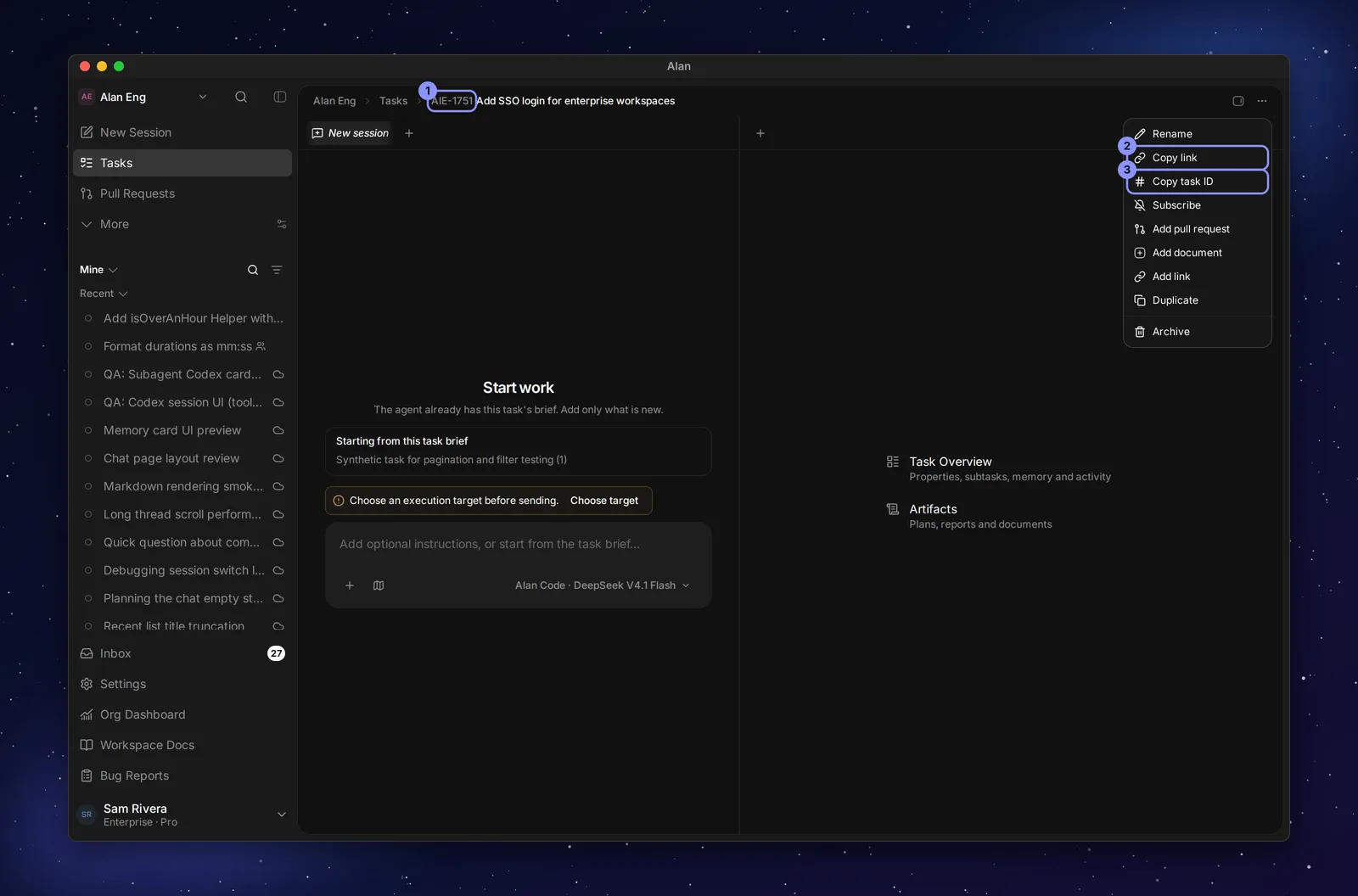
- Copy task ID copies the readable ID, for example
AIE-1751. - Copy link copies the task's URL.
- Task search matches the title, the readable ID (
AIE-964), or the bare number (964or#964).
Page URLs
Most record URLs use internal IDs. Opening a private record requires signing in and access to its team. Pull request URLs use the repository name and pull request number; invitation URLs use a token.
| Page | URL |
|---|---|
| Session | /teams/{teamId}/chats/{chatId} |
| Task | /teams/{teamId}/tasks/{taskId} (also opens under /backlog/{taskId}, or a cycle page with ?task={taskId}) |
| Epic | /teams/{teamId}/epics/{epicId} |
| Cycle | /teams/{teamId}/cycles/{cycleId} |
| Team document or whiteboard | /teams/{teamId}/docs/{documentId} |
| Workspace Docs page | /workspace/wiki/{documentId} |
| Automation | /teams/{teamId}/automations/{automationId} |
| Automation run | /teams/{teamId}/automations/sessions/{runId} |
| Pull request | /teams/{teamId}/pull-requests/{owner}/{repo}/{number} |
| Team settings | /teams/{teamId}/settings/{section}, for example /settings/tasks |
| Invitation | /invite/{token} |
Older links keep working: /teams/{teamId}/workflows/... and /teams/{teamId}/agents/... redirect to /automations/..., and /teams/{teamId}/overview redirects to the team's home. A team URL without a page, /teams/{teamId}, opens New Session.
Public links
Publishing a document, whiteboard, or artifact creates a read-only link that anyone can open without signing in:
https://<your Alan host>/share/{token}The token is random and is not the document's ID. Unpublish turns the link off. Links in the older formats /share/docs/{documentId} and /share/artifacts/{artifactId} redirect to the current link while the record is still published. See Documents.
Internal IDs used by agents
When an agent works with Alan's tools, it passes internal IDs. Each one names a different kind of record:
| ID | Identifies | Appears in |
|---|---|---|
teamId | A team | Every team URL |
taskId | A task or subtask | Task URLs |
conversationId | A session (called chatId in URLs) | Session URLs |
documentId | A team or Workspace Docs document, or a whiteboard | Docs URLs |
artifactId | An artifact | Agent tools; artifacts open from their task, session, or automation |
epicId, cycleId | An epic or cycle | Epic and cycle URLs |
An artifact has exactly one home: a task, an automation, or a standalone session. A team document belongs to the team, not to a task. See Documents and artifacts.
Never swap these IDs. Passing a taskId where a conversationId is expected, or inventing an ID, can attach an artifact to the wrong place, where nobody looks for it. Agents should use the IDs Alan gives them, and the url returned by Alan's tools rather than building URLs themselves.