Task detail
Use task detail as the source of truth for scope, sessions, decisions, and evidence.
The task page is where work on a task happens. Sessions run on the left; the task's record (overview, artifacts, and the agent's workspace) sits on the right.
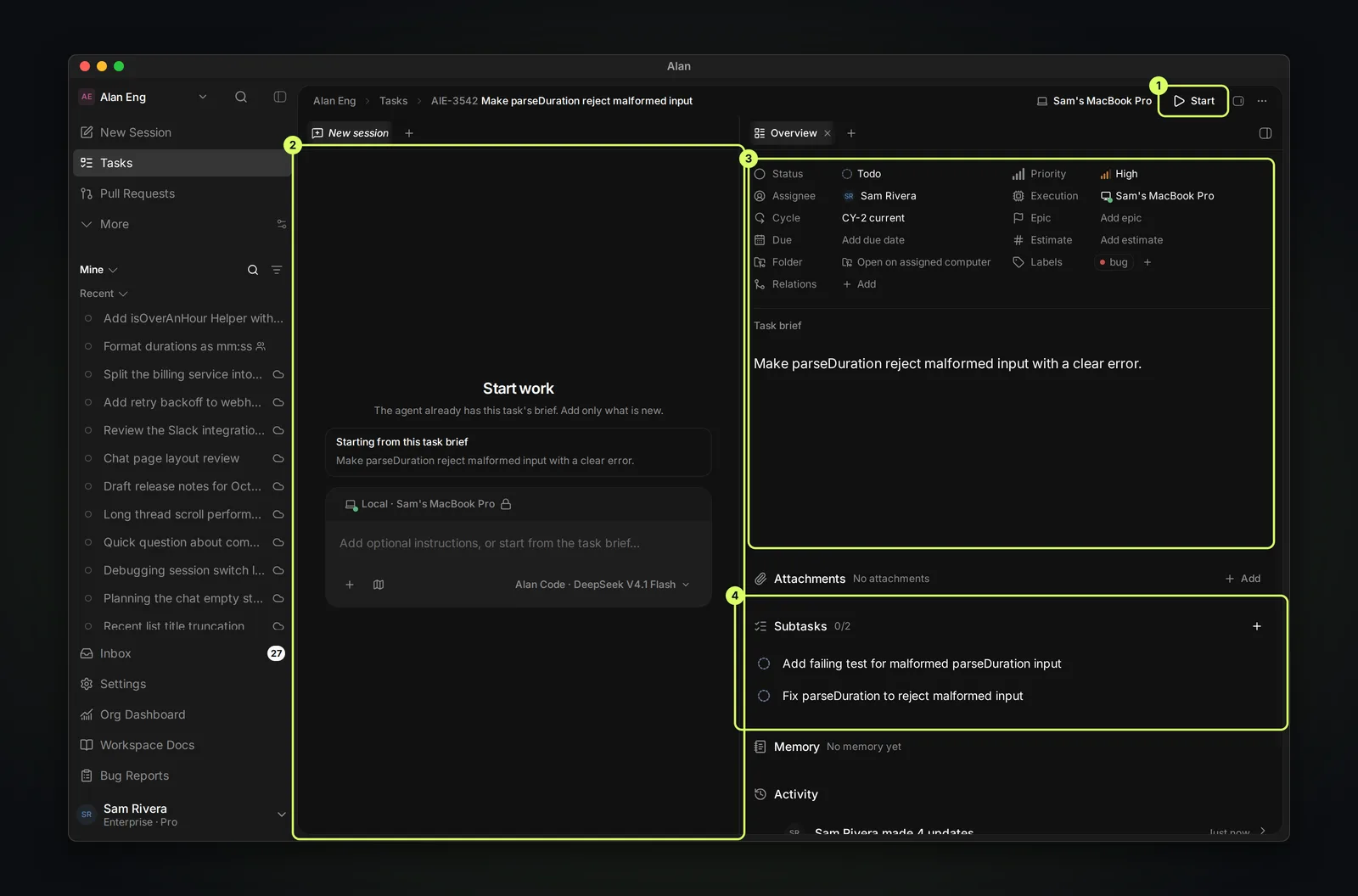
Header
- Execution target: where this task's sessions run, for example Sam's MacBook Pro or a cloud environment.
- Start: starts an Agent session on the task's target straight away, with the message "Let's begin working on this task." The agent already has the brief. Start is disabled with "Choose a cloud environment or switch to a computer before starting." until the task has a target, and it disappears once the task has a session or is Done or Cancelled.
- Open in side peek and Task actions (…).
Sessions (left)
Each session on the task is a tab; + adds another. A new task opens on Start work: the agent already has the task brief (Starting from this task brief), so add only what's new, or send the brief as is. The composer works like any other, including Plan mode; see Start a session.
When the task's first session starts, a task in a Not started status (such as Backlog or Todo) moves to the first Active status, In Progress by default. After that, status changes are up to you or the agent. For the whole loop, see Complete a task with an agent.
Workspace panels (right)
Open panels from the list on the right, or with + in the right-hand tab bar:
| Panel | What it shows |
|---|---|
| Task Overview | Properties, the brief, attachments, subtasks, memory, and activity |
| Artifacts | Plans, test reports, documents, and whiteboards. See Task artifacts. |
| Desktop | The agent's screen, when the session has one |
| Browser | Preview a page and pick elements from it |
| Changes | The working diff. Commit, Push, Create PR, and link or merge the task's pull requests. |
| Terminal | Run commands in the session's workspace |
| Files | Browse and edit the repository |
Desktop, Changes, Terminal, and Files need a session with an available workspace. Choosing an execution target alone does not make that workspace ready.
Task Overview
- Properties: Status, Assignee, Cycle, Due, Folder, Relations, Priority, Execution, Epic, Estimate, and Labels, plus Pull requests once one is linked. Select any value to change it.
- Pull requests: each linked pull request with its review and check status. Alan links one when an agent opens it from a task session, or when its title or branch contains the task ID. To link another, choose Task actions (…) → Add pull request.
- Task brief: the description the agent starts from.
- Attachments: files and links for the task (Add).
- Subtasks: smaller pieces, each with its own status. See Subtasks and status.
- Memory and Activity: what Alan remembers about the task, and the history of changes and comments.
Read before acting
Before starting a new session, check the brief, the subtasks, the latest plan or test report in Artifacts, and recent activity, so the agent doesn't repeat or contradict earlier work.
Sandbox and local-run context
For a task session, the selected target determines where work happens. Cloud gives the session an isolated sandbox in your team's cloud environment. It goes to sleep after a few idle minutes and wakes when you send a message; if it needs attention, the session shows recovery actions such as Repair session or Restart computer. This computer and Remote run in the folder chosen in the composer on a computer you connected; there is no cloud sandbox.
Uncommitted files in a cloud sandbox never reach the environment's image, so commit or push work you want to keep. To move a task between targets, use Switch environment and treat the two targets as separate filesystems. See Sandboxes, Cloud sessions and execution, and Local execution.
Side peek or full page
From lists, epics, and cycles, a task can open in a side peek. Use the full page when you need room for sessions, long artifacts, or the diff.