Review work
Start a Review Agent session on a pull request and get findings you can act on.
Every pull request in Alan has an Alan Review tab. Start a session there and the Review Agent reads the pull request, its commits, checks, and any linked task, then reports findings ordered by severity. It can run commands but can't edit files, so a review never changes your branch.
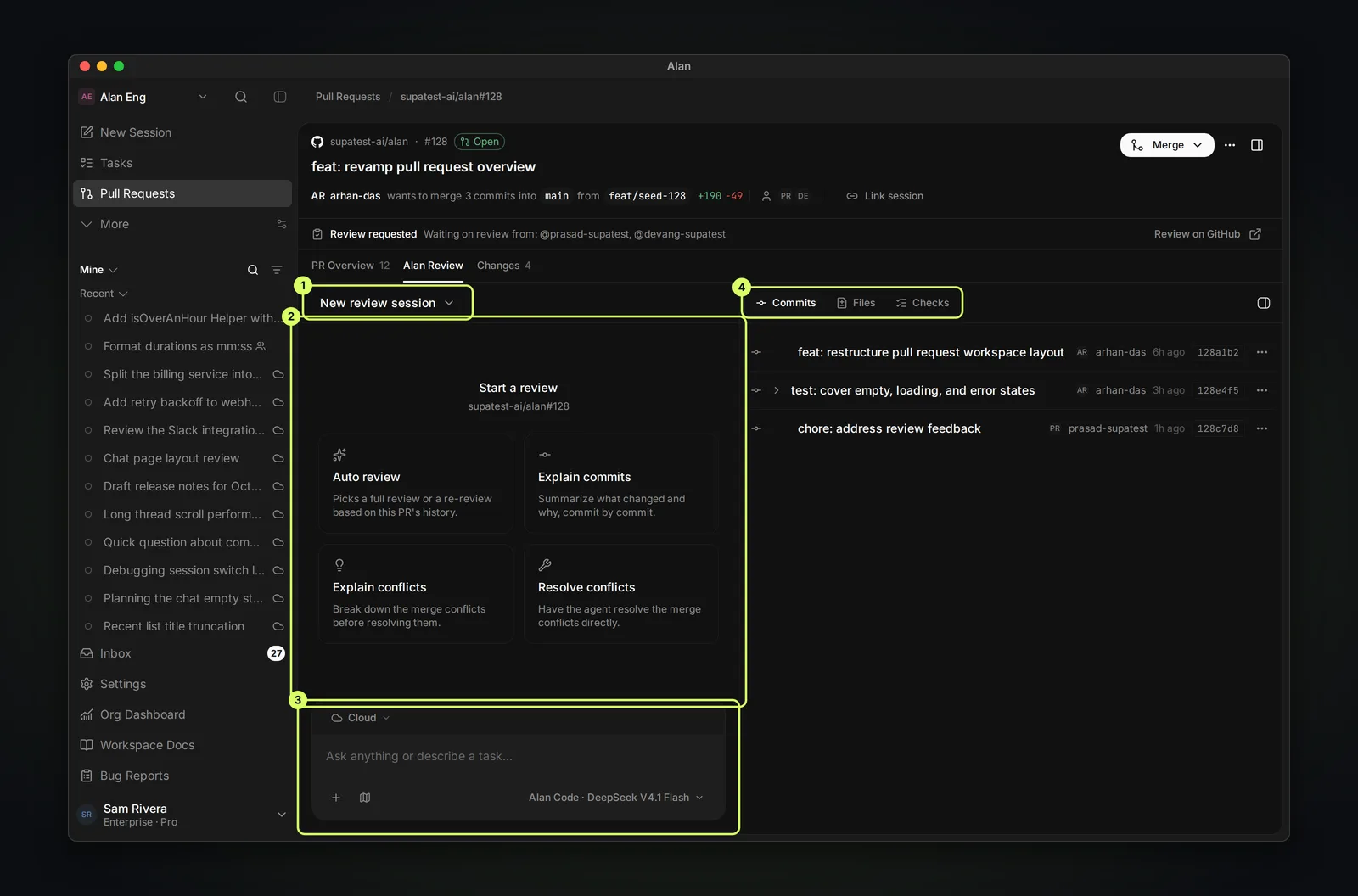
Start a review
- Open the pull request from Pull Requests and choose Alan Review.
- Check the execution target in the composer: a cloud environment or one of your computers. The review runs there, like any session. Without one, Alan shows "Select a local runtime or a cloud environment to start a PR review."
- Choose a starter, or type your own request and send it.
| Starter | What the agent does |
|---|---|
| Auto review | "Picks a full review or a re-review based on this PR's history." |
| Explain commits | "Summarize what changed and why, commit by commit." |
| Explain conflicts | "Break down the merge conflicts before resolving them." |
| Resolve conflicts | Requests a conflict fix. Review Agent sessions cannot edit files; use an editing session to apply the fix. |
When the session starts you'll see Review Agent session started. The session menu at the top (New review session until you pick one) lists every review session on this pull request, so you can return to an earlier review or start another.
If the pull request hasn't finished syncing, starting is blocked with "Sync this pull request before starting a session." Wait a moment and try again.
Point the agent at specifics
The panel on the right has Commits, Files, and Checks. Use their actions to drop a commit, file, or check into the composer, with Explain adding an instruction such as explaining a failing check. Close the panel with its toggle when you want more room for the conversation.
A focused request gets a better review than a general one:
Review this PR for regressions introduced by the diff. List findings first, most severe first, with file and line references. Call out missing tests for changed behavior. Skip style comments.What the Review Agent does
The Review Agent is one of Alan's agent profiles. It:
- Reads the pull request goal, changed files, and current checks.
- Reads the linked task's brief, decisions, and recent artifacts when a task is linked, so it reviews against the intended scope.
- Prioritizes correctness, regressions, data loss, security, migration risk, and missing tests.
- Reports findings by severity. If nothing blocks the merge, it says so and lists remaining test gaps.
- Can run commands and create artifacts, but can't edit files, start sessions, or manage subtasks.
You can also choose Review Agent for any session from the composer's + menu under Agents.
Keep the result
A review lives on the pull request: its sessions stay under Alan Review, and anyone on the team can open them. To share findings outside Alan, ask the agent to post them to the pull request as a review, or copy the summary into a comment from PR Overview.
If the pull request has a primary linked task, Alan also creates a review artifact on that task. If the findings change the task's plan, record the decision there. See Task artifacts.
Review automatically
To review pull requests without starting each session yourself, create an automation with the GitHub Review Requested trigger. See Create an automation.