Task artifacts
Attach durable outputs to the task instead of burying them in chat.
Artifacts save the outputs of a session: plans, test reports, documents, and whiteboards. When a session belongs to a task, its artifacts appear on that task. Standalone sessions can also have artifacts.
The rule of thumb: if someone should be able to resume this task tomorrow from the record alone, it belongs in an artifact, not a chat message.
The artifact types
| Artifact | What it captures | Typically produced by |
|---|---|---|
| Plan | What will change, why, how it will be verified, and open decisions | A session in Plan mode, Orchestrator, or PM Agent |
| Test report | What was tested, screenshots and recordings, and a pass, fail, or mixed result | A testing session after validation |
| Document | A written deliverable from the task, such as a summary, spec, or notes | Any agent, or you |
| Whiteboard | A diagram or sketch on a canvas | Any agent, or you |
Review sessions appear on the pull request. If the pull request has a primary linked task, Alan also creates a review document artifact on that task. See Review work.
Find and open artifacts
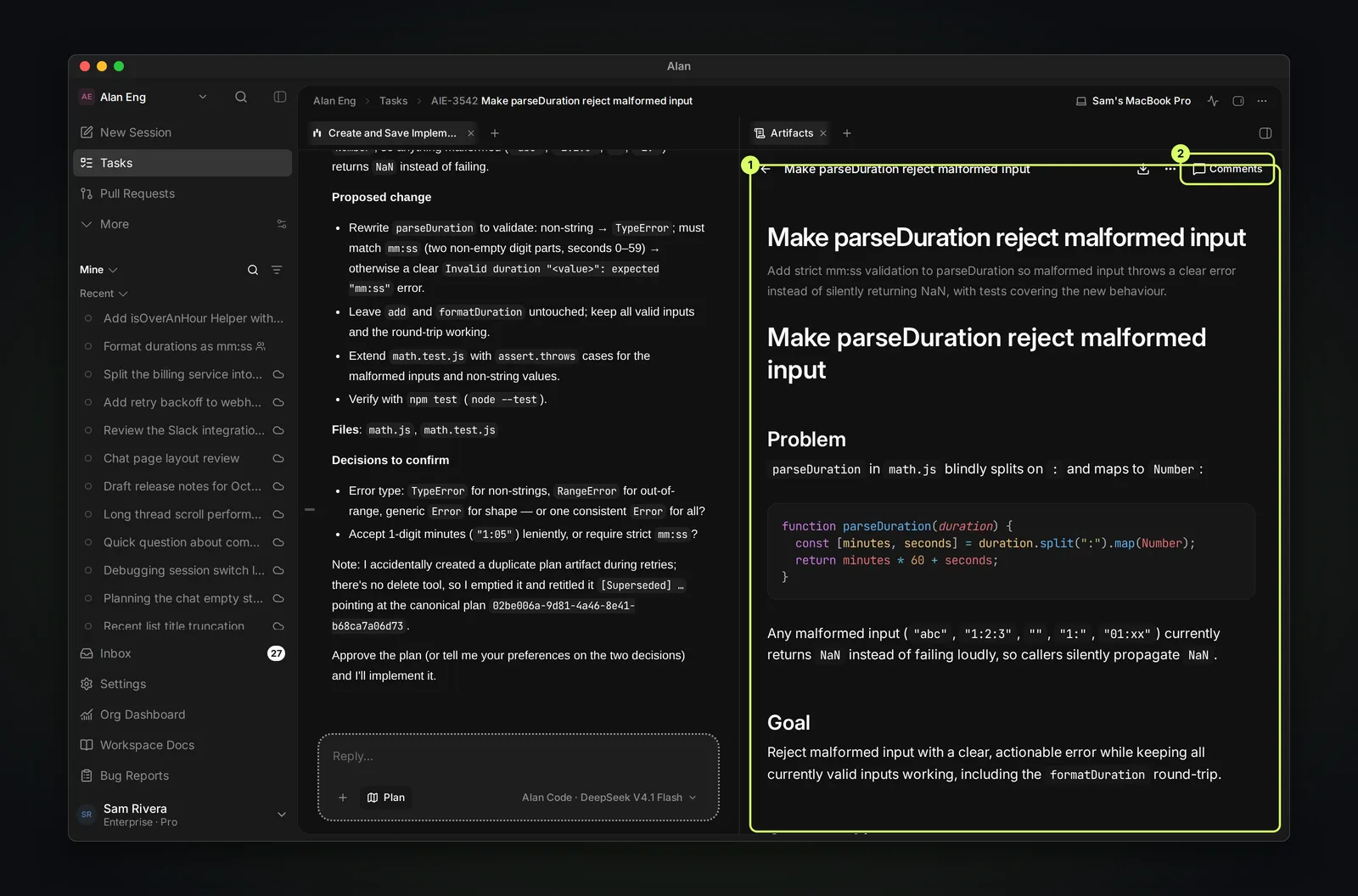
Open Artifacts in the task's right-hand panel. Each artifact shows its title, type, and age, for example Plan · just now. Select one to read it. The viewer has a download button, more actions (…), and Comments, so reviewers can discuss a plan line by line. Choose New to create a document, whiteboard, plan, or test report yourself.
Agents create artifacts with Alan's artifact tools. In Plan mode the agent saves its plan as an artifact when it can, and replies with a short summary in the session.
Document vs artifact
They look similar but belong in different places:
- An artifact is a saved session output. It appears on the task when the session belongs to one.
- A document is a standalone page in the team — a PRD, spec, or wiki — that is not tied to one task.
Choose based on where readers need to find it: save a task deliverable as an artifact, and reusable team knowledge as a document, even when you write it during a task. See Documents and artifacts.
When to create one
Ask for an artifact when someone needs to review or reuse the output later: an implementation plan, a test report, or a written deliverable. Short answers can stay in chat.
Common mistakes
Check that the artifact appears on the intended task before handing off the work. If you use Alan's API or agent tools, use the correct task and session context. See Links and IDs.
- Leaving a long plan only in chat, where it is harder to find later.
- Creating a standalone document for something that is really a task output.
- Accepting chat-only results as the final record for important work.
If an artifact does not appear where you expect it, see Missing artifact.