Product map
How teams, sessions, tasks, artifacts, documents, epics, cycles, and automations fit together.
Use this page to decide where to start work, where to find its results, and how to organize related tasks.
Find your way around
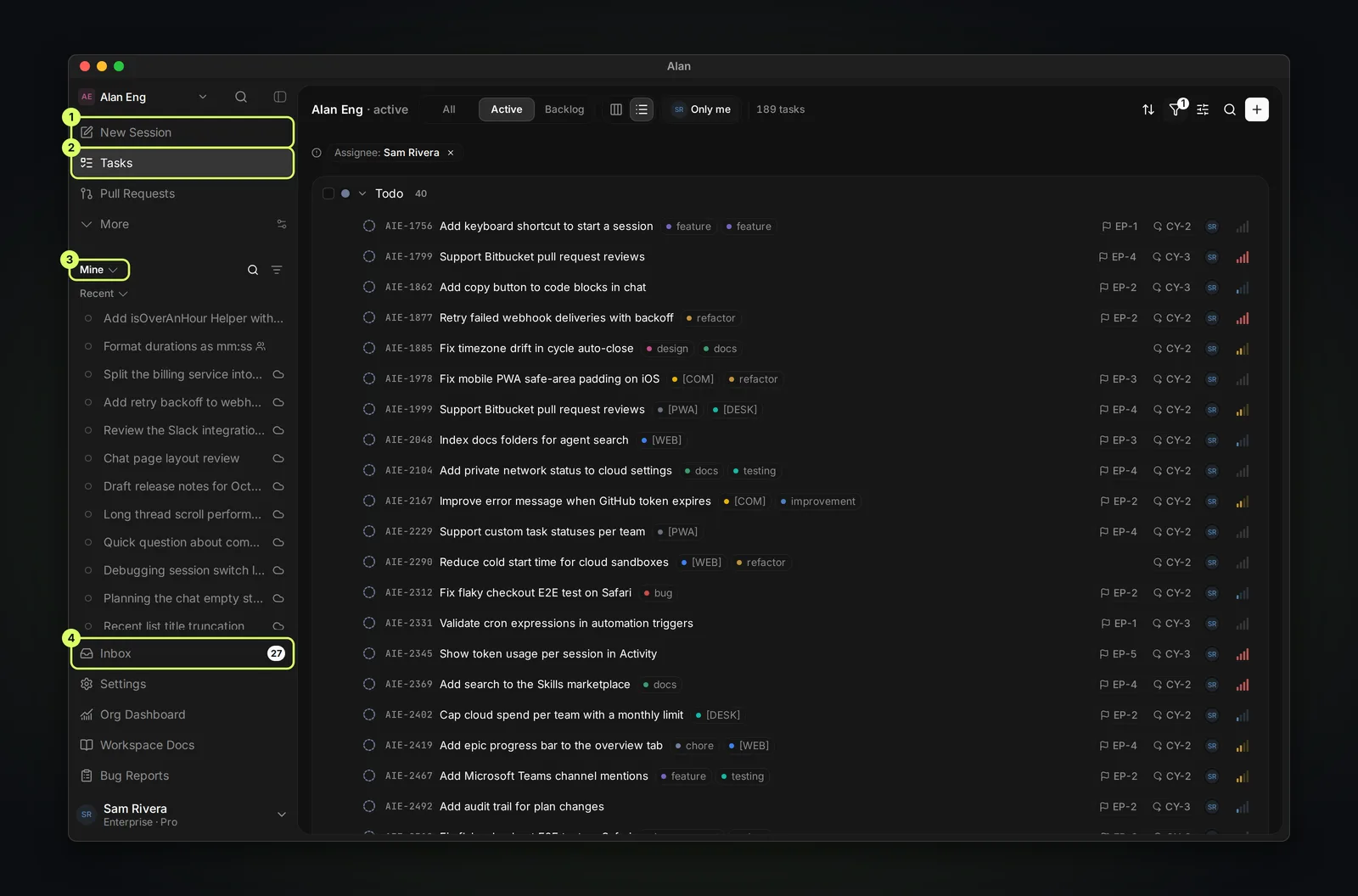
- Team pages: Tasks, Epics, Cycles, Pull Requests, Docs, Skills, Automations, and Dashboard. Tasks and Pull Requests are pinned by default; the rest sit under More. Use Customize sidebar to pin the ones you use. Tasks, Epics, and Cycles only appear once they are turned on for the team.
- Sessions: your recent sessions, with a scope selector for Mine, Mine + team, or Team.
- Workspace pages: Inbox (notifications), Settings, and Org Dashboard (for organization admins). Workspace Docs appears when it is enabled for the organization.
The core loop
A session is where an agent works. Put a session inside a task when the work should be tracked and reviewed, and ask for artifacts so the outputs outlive the session.
If you remember one thing: put work in a task, and ask for artifacts. A message scrolls away; an artifact stays on the task.
How everything connects
Everything hangs off a team, and teams belong to your workspace (organization). Planning objects group tasks; sessions and artifacts come out of them; documents are standalone knowledge.
The building blocks
Workspace
Your organization in Alan. It holds teams, members, the plan and billing, model providers, and shared connections. It is managed from Settings → Organisation; membership, billing, and the organization's name are limited to organization admins.
Team
The container for day-to-day work. A team owns its members, repositories, integrations, computers, cloud environment, sessions, tasks, docs, skills, and automations. Switch teams to see the work and settings for that team.
Session
A conversation where an agent works on a cloud sandbox or a connected computer. You can return to it and send more messages. Start one from New Session, from a task, from Slack or Microsoft Teams, or from an automation.
Task
The unit of tracked work, with a title, status, priority, assignee, labels, subtasks, sessions, and artifacts. A task can hold several sessions when work branches into planning, building, and testing.
Artifact
A durable output: a plan, a test report, a document, or a whiteboard. Artifacts can carry comments and can be shared with a public link.
Organizing and automating
Epics
Group related tasks into a larger initiative with its own overview and activity.
Cycles
Time-boxed planning windows, 14 days by default.
Documents
Standalone team knowledge such as PRDs, specs, and wikis, plus whiteboards.
Automations
Agent runs that start on a schedule, on demand, or from an integration event.
Task or document?
A task is work with a start and an end that someone reviews. A document is knowledge with no single owning task. A spec everyone will reference for months is a document. Use a task when you need to track an agent's work; quick requests can stay in a standalone session.